목차
1. 개요 및 특징2. Installer 방법
3. 인증 Mode (JWT Bearer Token)
4. 응답 표준 형식
5. Tout 엔드포인트 Liste (22 éléments)
6. 인증 API — /api/v1/auth/*
7. Forum/Publications API — /api/v1/boards/*
8. Commentaires API — /api/v1/posts/*
9. Membres API — /api/v1/members/*
10. Fichier 업로드 API — /api/v1/upload/*
11. Administrateur 화면 사용법
12. 테스트 방법 (테스터 / cURL / Postman / React Native)
13. 다른 플러그인에서 API 확장하기
14. Erreur 코드 Liste
15. Sécurité 권장 사항
1. 개요 및 특징
DX API 플러그인은 DXCMS를 완전한 REST API 서버로 전환합니다. React Native, Flutter, Next.js, Vue 등 모든 프론트엔드와 외부 시스템에서 JSON으로 DXCMS 데이터를 활용할 수 있습니다.주요 특징
• Laravel Style RESTful API — 동일한 URL 구조, 동일한 응답 형식
• JWT-like Bearer Token 인증 — Access Token(1Heure) + Refresh Token(30jours) + 토큰 로테이션
• 기존 DXCMS 코드 완전 비침습 — 웹 기능 그대로 동작
• Plugins Désactiver 시 API 완전 종료 — Sécurité 제어 Possible
• 훅 기반 확장 — 다른 플러그인이 엔드포인트 추가 Possible (dx_api_endpoints)
• CORS Automatique 처리 — React Native, 웹앱 Immédiat 연동
• Rate Limiting — Connexion 분당 10fois, Inscription 분당 5fois 제한
• Fichier 업로드 — Image/Fichier 분리, Forum Configuration Automatique Appliquer, 2단계 연결 Mode
• PHP 5.6+ 호환 — 외부 라이브러리 Aucun
| Catégories | 엔드포인트 수 | 주요 기능 |
| 인증 (Auth) | 5 éléments | Connexion, Inscription, Se déconnecter, 토큰 갱신, 내 정보 |
| Forum/Publications | 7 éléments | Liste, 상세, 작성(file_ids 포함), Modifier, Supprimer |
| Commentaires | 3 éléments | Liste, 작성, Supprimer |
| Membres | 3 éléments | Profil, 정보 Modifier, Mot de passe Changer |
| Fichier 업로드 | 4 éléments | Image 업로드, Fichier 업로드, Publications 연결, Supprimer |
2. Installer 방법
Fichier 구조
plugins/
  dx-api/
    manifest.php
    plugin.php              ← 훅 등록, DB 테이블 설치
    admin/
      index.php             ← 관리자 화면 (대시보드 + 테스터)
    core/
      Request.php           ← 입력 처리 (Laravel Request 유사)
      Response.php          ← JSON 응답 표준화
      Router.php            ← 라우팅 엔진 + 미들웨어
      Token.php             ← JWT 토큰 발급/검증
    endpoints/
      auth.php              ← 인증 엔드포인트
      boards.php            ← 게시판/게시글 엔드포인트
      comments.php          ← 댓글 엔드포인트
      members.php           ← 회원 엔드포인트
      upload.php            ← 파일 업로드 엔드포인트

admin/
  dx-api/
    index.php               ← 관리자 라우팅 진입점

core/api/
  v1.php                    ← DXCMS dispatchApi() 진입점
Installer 절차
1. plugins/dx-api/ 폴더를 DXCMS 루트의 plugins/ 폴더에 Copier2. admin/dx-api/index.php 를 DXCMS 루트의 admin/dx-api/ 폴더에 Copier
3. core/api/v1.php 를 DXCMS 루트의 core/api/ 폴더에 Copier
4. Administrateur → Plugins → DX API → Activer
5. Activer 시 api_tokens 테이블 Automatique 생성
6. Administrateur → Site → DX API 메뉴 OK
admin/index.php 사이드바에 DX API 메뉴가 없으면: Site Configuration 바로 Dans le champ ci-dessous, adm_nav('DX API', '/admin/dx-api', ...) 한 Ligne 추가 Requis
core/api/v1.php 복사를 빠뜨리면 /api/v1/* 모든 요청이 404 반환
3. 인증 Mode (JWT Bearer Token)
DX API는 세션/쿠키 대신 Bearer Token 방식을 사용합니다. 인증이 필요한 모든 요청에 Authorization 헤더를 포함해야 합니다.토큰 Type
| 토큰 | 유효시간 | Enregistrer Emplacement | 용도 |
| Access Token | 1Heure (3600초) | 앱 메모리 / SecureStore | API Requête 인증 헤더에 Utiliser |
| Refresh Token | 30jours | 앱 SecureStore / Keychain | Access Token 만료 시 갱신 |
인증 흐름
1. 로그인
   POST /api/v1/auth/login
   → { access_token, refresh_token, expires_in: 3600, user: {...} }

2. API 요청 시 헤더 포함
   Authorization: Bearer {access_token}

3. Access Token 만료(1시간) 후 갱신
   POST /api/v1/auth/refresh
   Body: { "refresh_token": "..." }
   → 새 access_token + 새 refresh_token 발급 (기존 토큰 파기)

4. 로그아웃
   POST /api/v1/auth/logout
   → DB의 Refresh Token 파기, 모든 기기 로그아웃
토큰 로테이션: Refresh Token Utiliser 시 Immédiat 파기되고 새 토큰 발급. 탈취 시 재사용 Impossible.
IIS 환경: Authorization 헤더가 전달되지 않으면 web.config에 requestFiltering Configuration Requis
4. 응답 표준 형식
Réussi 응답
{
  "success": true,
  "message": "성공 메시지",     // 선택
  "data": { ... }              // 단건: object / 목록: array
}
페이지네이션 응답
{
  "success": true,
  "data": [ ... ],
  "meta": {
    "total": 100,              // 전체 건수
    "page": 1,                 // 현재 페이지
    "per_page": 20,            // 페이지당 건수
    "last_page": 5,            // 마지막 페이지
    "has_more": true           // 다음 페이지 존재 여부
  }
}
에러 응답
{
  "success": false,
  "message": "에러 메시지",
  "code": "UNAUTHORIZED",       // 머신리더블 코드
  "errors": {                  // Validation 오류 시만
    "login_id": "아이디를 입력하세요.",
    "password": "비밀번호를 입력하세요."
  }
}
HTTP État 코드
| 코드 | 의미 | 발생 상황 |
| 200 | OK | 정상 처리 |
| 201 | Created | Publications/Commentaires 작성, Fichier 업로드, Inscription Réussi |
| 400 | Bad Request | 잘못된 Requête, 업로드 Erreur |
| 401 | Unauthorized | 토큰 Aucun/만료, Connexion Échec |
| 403 | Forbidden | 권한 Aucun, Fichier 업로드 비허용 Forum |
| 404 | Not Found | Forum/Publications/Fichier Aucun |
| 422 | Validation Error | Obligatoire 입력값 누락, 형식 Erreur |
| 429 | Too Many Requests | Rate Limit 초과 |
| 500 | Internal Server Error | 서버/DB Erreur |
5. Tout 엔드포인트 Liste (22 éléments)
| 메서드 | 엔드포인트 | Description | 인증 |
| POST | /api/v1/auth/login | Connexion → 토큰 발급 | |
| POST | /api/v1/auth/register | Inscription → Automatique Connexion | |
| POST | /api/v1/auth/logout | Se déconnecter → 토큰 파기 | 🔒 |
| POST | /api/v1/auth/refresh | Access Token 갱신 | |
| GET | /api/v1/auth/me | 내 정보 Vues | 🔒 |
| GET | /api/v1/boards | Forum Liste | |
| GET | /api/v1/boards/:board_key | Forum 정보 | |
| GET | /api/v1/boards/:board_key/posts | Publications Liste (페이지네이션) | 권한별 |
| GET | /api/v1/boards/:board_key/posts/:id | Publications 상세 + Pièces jointes | 권한별 |
| POST | /api/v1/boards/:board_key/posts | Publications 작성 (file_ids 포함) | 🔒 |
| PUT | /api/v1/boards/:board_key/posts/:id | Publications Modifier | 🔒 |
| DELETE | /api/v1/boards/:board_key/posts/:id | Publications Supprimer (소프트) | 🔒 |
| GET | /api/v1/posts/:post_id/comments | Commentaires Liste | |
| POST | /api/v1/posts/:post_id/comments | Commentaires 작성 | 🔒 |
| DELETE | /api/v1/posts/:post_id/comments/:id | Commentaires Supprimer | 🔒 |
| GET | /api/v1/members/:login_id | Membres Public Profil | |
| PUT | /api/v1/members/me | 내 정보 Modifier | 🔒 |
| PUT | /api/v1/members/me/password | Mot de passe Changer | 🔒 |
| POST | /api/v1/upload/image | Image 업로드 (multipart) | 🔒 |
| POST | /api/v1/upload/file | Fichier 업로드 (multipart) | 🔒 |
| POST | /api/v1/upload/attach | Fichier-Publications 연결 | 🔒 |
| DELETE | /api/v1/upload/:file_id | 임시 Fichier Supprimer | 🔒 |
6. 인증 API — /api/v1/auth/*
6-1. Connexion
POST /api/v1/auth/loginIdentifiant 또는 이메일로 Connexion. Réussi 시 Access Token + Refresh Token 발급.
파라미터
| Nom | Emplacement | Obligatoire | Description |
| login_id | Body | Obligatoire | Identifiant 또는 E-mail |
| password | Body | Obligatoire | Mot de passe |
Request Body (JSON)
{"login_id": "admin","password": "비밀번호"}
Response
{"success": true,"data": {
  "token_type": "Bearer",
  "access_token": "eyJ...",
  "refresh_token": "a1b2c3...",
  "expires_in": 3600,
  "user": { "id": "...", "login_id": "admin", "name": "관리자", "role": "admin", "level": "9", "point": "500" }
}}
rate:10 — IP당 분당 10fois 초과 시 429 반환
6-2. Inscription
POST /api/v1/auth/register신규 Inscription. Réussi 시 Automatique 로그인되어 토큰 Immédiat 반환 (HTTP 201).
파라미터
| Nom | Emplacement | Obligatoire | Description |
| login_id | Body | Obligatoire | Identifiant (4자 이상) |
| password | Body | Obligatoire | Mot de passe (6자 이상) |
| name | Body | Obligatoire | Nom/Pseudo |
| Body | Choisir |
Request Body (JSON)
{"login_id": "newuser","password": "pass1234","name": "홍길동","email": "user@email.com"}
Response
{"success": true,"message": "회원가입이 완료되었습니다.","data": { "token_type": "Bearer", "access_token": "...", ... }}
rate:5 — IP당 분당 5fois 초과 시 429 반환
site_settings de join_level=0 이면 Inscription Impossible (403)
6-3. Se déconnecter
POST /api/v1/auth/logoutActuel 기기의 Refresh Token 파기. 이후 토큰 갱신 Impossible.
🔒 Authorization: Bearer {access_token} 헤더 Requis
Response
{"success": true,"message": "로그아웃 되었습니다."}
6-4. Access Token 갱신
POST /api/v1/auth/refreshRefresh Token으로 새 Access Token 발급. 기존 Refresh Token은 Immédiat 파기되고 새 토큰 발급 (토큰 로테이션).
파라미터
| Nom | Emplacement | Obligatoire | Description |
| refresh_token | Body | Obligatoire | Connexion 시 발급된 refresh_token |
Request Body (JSON)
{"refresh_token": "a1b2c3..."}
Response
{"success": true,"data": {"token_type": "Bearer","access_token": "eyJ...(새)","refresh_token": "d4e5f6...(새)","expires_in": 3600}}
기존 refresh_token은 Immédiat 폐기됨. 새로 발급된 토큰만 유효.
6-5. 내 정보 Vues
GET /api/v1/auth/meActuel 로그인한 사용자 정보 반환. Mot de passe 등 민감 정보는 제외.
🔒 Authorization: Bearer {access_token} 헤더 Requis
Response
{"success": true,"data": {"id": "...","login_id": "admin","name": "관리자","email": "admin@example.com","role": "admin","level": "9","point": "500","profile_img": null}}
7. Forum/Publications API — /api/v1/boards/*
7-1. Forum Liste
GET /api/v1/boards활성화된 Forum Tout Liste 반환.
Response
{"success": true,"data": [{"id":"1","board_name":"자유게시판","board_key":"free","board_type":"normal","description":"...","read_level":"0","write_level":"1"},...]}
7-2. Publications Liste
GET /api/v1/boards/:board_key/postsPublications Liste 반환. 페이지네이션, Recherche, Catégories 필터 지원.
파라미터
| Nom | Emplacement | Obligatoire | Description |
| board_key | URL | Obligatoire | Forum 키 (예: free) |
| page | Query | Choisir | Page N° (Par défaut: 1) |
| per_page | Query | Choisir | 페이지당 건수 (Par défaut: 20, 최대: 100) |
| q | Query | Choisir | Mots-clés (Titre+Contenu) |
| category | Query | Choisir | Catégories 필터 |
Response
{"success": true,"data": [{"id":"...","title":"제목","category":"공지","view_count":"150","like_count":"12","comment_count":"5","thumbnail":"...","author_name":"홍길동","author_id":"hong","excerpt":"내용 미리보기...","created_at":"2026-07-22 09:00:00"}],"meta": {"total": 100,"page": 1,"per_page": 20,"last_page": 5,"has_more": true}}
Forum read_level에 따라 비로그인 접근 제한 Possible
7-3. Publications 상세
GET /api/v1/boards/:board_key/posts/:idPublications 상세 + Pièces jointes Liste + 여분필드 반환. Vues Automatique 증가.
파라미터
| Nom | Emplacement | Obligatoire | Description |
| board_key | URL | Obligatoire | Forum 키 |
| id | URL | Obligatoire | Publications ID |
Response
{"success": true,"data": {"id":"...","title":"제목","content":"<p>본문HTML</p>","files": [{"id":"1","orig_name":"사진.jpg","file_ext":"jpg","file_size":"102400","url":"https://사이트.com/data/uploads/..."}],"extra_fields": {...},"author_name":"홍길동","created_at":"..."}}
files는 Éditeur 삽입 Image 제외, 직접 업로드한 파일만 포함
7-4. Publications 작성
POST /api/v1/boards/:board_key/postsPublications 작성. 업로드된 파일을 file_ids로 연결 Possible.
🔒 Authorization: Bearer {access_token} 헤더 Requis
파라미터
| Nom | Emplacement | Obligatoire | Description |
| board_key | URL | Obligatoire | Forum 키 |
Request Body (JSON)
{"title": "게시글 제목","content": "<p>본문 HTML</p>","category": "공지","file_ids": [1, 2, 3]}
Response
{"success": true,"message": "게시글이 등록되었습니다.","data": {"id": "1784211424708247","post_id": "1784211424708247"}}
file_ids: /api/v1/upload/* 로 먼저 업로드 후 반환된 file_id 배열 전달
Miniature Automatique 생성 (Forum thumb Configuration Appliquer)
7-5. Publications Modifier
PUT /api/v1/boards/:board_key/posts/:idPublications Modifier. 본인 또는 Administrateurs uniquement Possible.
🔒 Authorization: Bearer {access_token} 헤더 Requis
파라미터
| Nom | Emplacement | Obligatoire | Description |
| board_key | URL | Obligatoire | Forum 키 |
| id | URL | Obligatoire | Publications ID |
Request Body (JSON)
{"title": "수정된 제목","content": "<p>수정된 내용</p>","category": "일반"}
Response
{"success": true,"message": "게시글이 수정되었습니다.","data": {"id": "..."}}
변경할 필드만 포함해도 됨 (부분 Modifier 지원)
7-6. Publications Supprimer
DELETE /api/v1/boards/:board_key/posts/:idPublications 소프트 Supprimer (status=0). 본인 또는 Administrateurs uniquement Possible.
🔒 Authorization: Bearer {access_token} 헤더 Requis
파라미터
| Nom | Emplacement | Obligatoire | Description |
| board_key | URL | Obligatoire | Forum 키 |
| id | URL | Obligatoire | Publications ID |
Response
{"success": true,"message": "게시글이 삭제되었습니다."}
소프트 Supprimer: DB에서 status=0 처리. 실제 데이터는 유지됨.
8. Commentaires API — /api/v1/posts/*
8-1. Commentaires Liste
GET /api/v1/posts/:post_id/commentsCommentaires Liste. Par défaut 페이지당 50 éléments.
파라미터
| Nom | Emplacement | Obligatoire | Description |
| post_id | URL | Obligatoire | Publications ID |
| page | Query | Choisir | Page N° |
| per_page | Query | Choisir | 건수 (Par défaut: 50) |
Response
{"success": true,"data": [{"id":"...","content":"댓글 내용","parent_id":"0","depth":"0","is_secret":"0","author_name":"홍길동","author_id":"hong","created_at":"..."}],"meta": {"total": 30,"page": 1,"per_page": 50}}
parent_id=0: 최상위 Commentaires / parent_id>0: 대댓글
8-2. Commentaires 작성
POST /api/v1/posts/:post_id/commentsCommentaires 작성. 대댓글 지원.
🔒 Authorization: Bearer {access_token} 헤더 Requis
파라미터
| Nom | Emplacement | Obligatoire | Description |
| post_id | URL | Obligatoire | Publications ID |
Request Body (JSON)
{"content": "댓글 내용","parent_id": 0}
Response
{"success": true,"message": "댓글이 등록되었습니다.","data": {"id": "..."}}
parent_id: 0=최상위, 부모댓글ID=대댓글
Commentaires 작성 시 posts.comment_count Automatique 증가
8-3. Commentaires Supprimer
DELETE /api/v1/posts/:post_id/comments/:idCommentaires 소프트 Supprimer. 본인 또는 Administrateurs uniquement Possible.
🔒 Authorization: Bearer {access_token} 헤더 Requis
파라미터
| Nom | Emplacement | Obligatoire | Description |
| post_id | URL | Obligatoire | Publications ID |
| id | URL | Obligatoire | Commentaires ID |
Response
{"success": true,"message": "댓글이 삭제되었습니다."}
Supprimer 시 posts.comment_count Automatique 감소 (최소 0)
9. Membres API — /api/v1/members/*
9-1. Membres Public Profil
GET /api/v1/members/:login_idMembres Public 정보 Vues. Mot de passe 등 민감 정보 제외.
파라미터
| Nom | Emplacement | Obligatoire | Description |
| login_id | URL | Obligatoire | Membres Connexion Identifiant |
Response
{"success": true,"data": {"id":"...","name":"홍길동","login_id":"hong","level":"5","point":"1200","bio":"자기소개","profile_img":null,"join_date":"2026-01-01 00:00:00"}}
9-2. 내 정보 Modifier
PUT /api/v1/members/meNom, E-mail Modifier. 변경할 항목만 포함.
🔒 Authorization: Bearer {access_token} 헤더 Requis
Request Body (JSON)
{"name": "새이름","email": "new@email.com"}
Response
{"success": true,"message": "회원 정보가 수정되었습니다."}
name 또는 email 중 하나 이상 Requis
9-3. Mot de passe Changer
PUT /api/v1/members/me/passwordMot de passe Changer. Changer Réussi 시 모든 Appareil 토큰 파기.
🔒 Authorization: Bearer {access_token} 헤더 Requis
Request Body (JSON)
{"current_password": "현재비밀번호","new_password": "새비밀번호"}
Response
{"success": true,"message": "비밀번호가 변경되었습니다. 다시 로그인하세요."}
Mot de passe Changer 후 모든 기기에서 재로그인 Requis (Tout Refresh Token 파기)
new_password 6자 이상 Obligatoire
10. Fichier 업로드 API — /api/v1/upload/*
2단계 방식으로 동작합니다. 먼저 파일을 업로드(file_id 반환)하고, Publications 작성 시 file_ids 배열로 연결합니다.
【업로드 흐름】

1단계: 파일 업로드 (post_id=0으로 임시 저장)
  POST /api/v1/upload/image  또는  POST /api/v1/upload/file
  → { file_id: 42, url: "https://..." }

2단계: 게시글 작성 시 file_ids 포함 (자동 연결)
  POST /api/v1/boards/free/posts
  Body: { "title": "...", "content": "...", "file_ids": [42, 43] }

또는 게시글 작성 후 별도 연결
  POST /api/v1/upload/attach
  Body: { "post_id": "...", "file_ids": [42, 43] }
10-1. Image 업로드
POST /api/v1/upload/imageImage 파일만 Autoriser. multipart/form-data Envoyer.
🔒 Authorization: Bearer {access_token} 헤더 Requis
파라미터
| Nom | Emplacement | Obligatoire | Description |
| file | Form | Obligatoire | Image Fichier (jpg, jpeg, png, gif, webp, bmp) |
| board_key | Form | Obligatoire | Forum 키 (업로드 권한 및 Miniature Configuration Appliquer) |
Request Body (JSON)
// multipart/form-data 전송 (JSON 아님)
// React Native FormData 사용
Response
{"success": true,"message": "이미지가 업로드되었습니다.","data": {"file_id": 42,"url": "https://사이트.com/data/uploads/boards/free/20260722_abc123.jpg","save_path": "boards/free/20260722_abc123.jpg","orig_name": "product.jpg","file_size": 102400,"file_ext": "jpg","is_image": true}}
Content-Type: multipart/form-data (JSON 아님)
Forum use_file=0 이면 403 반환
Système upload_max_size 초과 시 400 반환
Image getimagesize() 검증 — 위장 Fichier Blocage
Miniature Automatique 생성 (Forum thumb Configuration Appliquer)
10-2. Fichier 업로드
POST /api/v1/upload/fileImage 포함 모든 Fichier. 위험 확장자 Automatique Blocage.
🔒 Authorization: Bearer {access_token} 헤더 Requis
파라미터
| Nom | Emplacement | Obligatoire | Description |
| file | Form | Obligatoire | 업로드할 Fichier |
| board_key | Form | Obligatoire | Forum 키 |
Request Body (JSON)
// multipart/form-data 전송
Response
{"success": true,"data": {"file_id": 43,"url": "https://...","orig_name": "document.pdf","file_ext": "pdf","is_image": false,...}}
Blocage 확장자: php, exe, sh, bat, js, jar, asp, jsp 등 20 éléments
Système upload_allowed_ext Configuration Automatique Appliquer
10-3. Fichier-Publications 연결
POST /api/v1/upload/attach업로드된 임시 Fichier(post_id=0)을 게시글에 연결.
🔒 Authorization: Bearer {access_token} 헤더 Requis
Request Body (JSON)
{"post_id": "1784211424708247","file_ids": [42, 43]}
Response
{"success": true,"message": "2개 파일이 게시글에 연결되었습니다.","data": {"post_id": "...","attached": 2,"requested": 2}}
이미 다른 게시글에 연결된 Fichier(post_id!=0)은 연결 Impossible (Sécurité)
본인 Publications 또는 Administrateurs uniquement Possible
10-4. 임시 Fichier Supprimer
DELETE /api/v1/upload/:file_id게시글에 연결되지 않은 임시 Fichier(post_id=0) Supprimer.
🔒 Authorization: Bearer {access_token} 헤더 Requis
파라미터
| Nom | Emplacement | Obligatoire | Description |
| file_id | URL | Obligatoire | 삭제할 Fichier ID |
Response
{"success": true,"message": "파일이 삭제되었습니다."}
post_id=0 인 파일만 Supprimer Possible. 이미 게시글에 연결된 Fichier 보호.
물리 Fichier + Miniature + DB 레코드 모두 Supprimer
11. Administrateur 화면 사용법
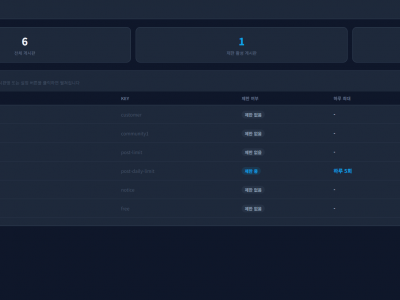
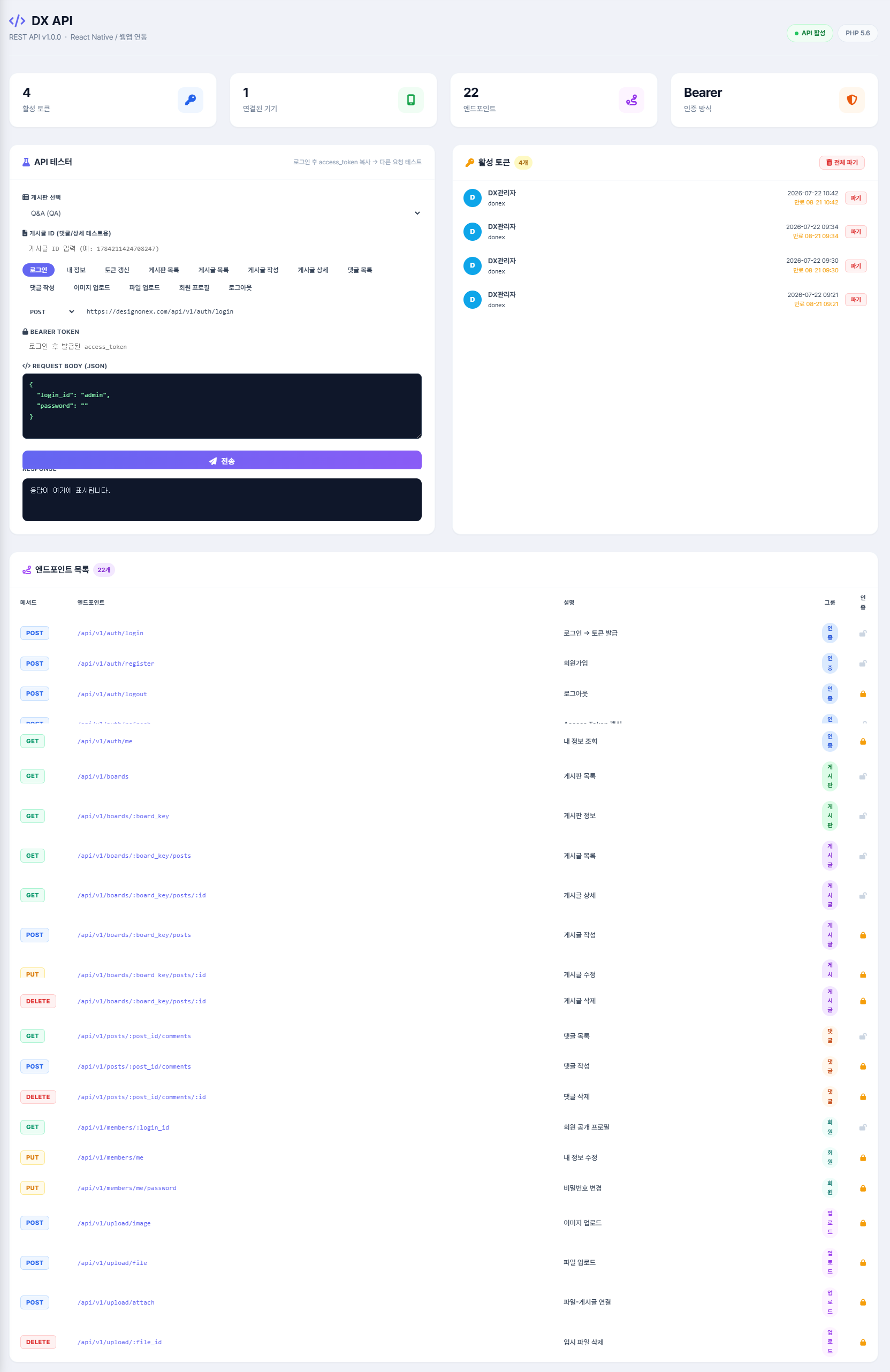
Administrateur → Site → DX API 또는 /admin/dx-api 접속Tableau de bord
| Élément | Description |
| Actif 토큰 | Actuel 유효한 Refresh Token 수 |
| 연결된 Appareil | 토큰이 발급된 고유 Membres 수 |
| 엔드포인트 | 등록된 API 엔드포인트 수 (22 éléments) |
| 인증 Mode | Bearer Token Mode Afficher |
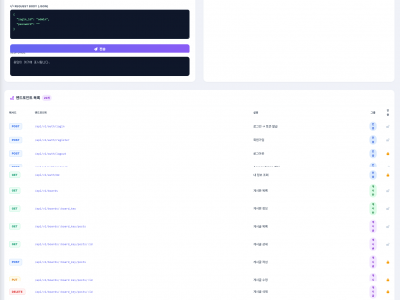
API 테스터 사용법
1. Forum Choisir 드롭다운에서 테스트할 Forum Choisir2. Publications ID Saisie (Commentaires/Publications 상세 테스트 시)
3. Haut 프리셋 Bouton 클릭 (Connexion, Publications Liste, Commentaires 작성, Fichier 업로드 등)
4. Fichier 업로드 프리셋 Choisir 시 Fichier Choisir Champ Automatique Afficher
5. Envoyer Bouton 클릭
6. Connexion Réussi 시 "access_token 자동입력" Bouton 클릭 → 이후 요청에 Automatique 포함
토큰 Gestion
• Actif 토큰 Liste: 회원별 발급일시, 만료일시 OK• 개별 파기: 특정 회원의 기기에서 Se déconnecter 처리
• Tout 파기: Tout 앱 사용자 재로그인 Requis (긴급 Sécurité 조치)
토큰 파기 후에도 만료되지 않은 Access Token은 최대 1Heure 유효. 즉각 차단은 Plugins Désactiver.
12. 테스트 방법
12-1. Administrateur 내장 테스터
/admin/dx-api 에서 브라우저로 바로 테스트 Possible. 별도 도구 불필요.12-2. cURL
Connexion
curl -X POST https://사이트.com/api/v1/auth/login \
  -H "Content-Type: application/json" \
  -d '{"login_id":"admin","password":"비밀번호"}'
Publications Liste
curl https://사이트.com/api/v1/boards/free/posts
인증 Requête
curl https://사이트.com/api/v1/auth/me \
  -H "Authorization: Bearer eyJ..."
Publications 작성
curl -X POST https://사이트.com/api/v1/boards/free/posts \
  -H "Content-Type: application/json" \
  -H "Authorization: Bearer eyJ..." \
  -d '{"title":"테스트 글","content":"<p>내용</p>"}'
Image 업로드 (cURL)
curl -X POST https://사이트.com/api/v1/upload/image \
  -H "Authorization: Bearer eyJ..." \
  -F "file=@/path/to/image.jpg" \
  -F "board_key=free"
12-3. Postman
1. 새 컬렉션 생성: DX API2. 환경 변수 Configuration: BASE_URL = https://Site.com, ACCESS_TOKEN = (비어있음)
3. Connexion Requête Tests 탭에 Automatique 토큰 Enregistrer Script 추가:
const res = pm.response.json();
if (res.success) {
  pm.environment.set("ACCESS_TOKEN", res.data.access_token);
  pm.environment.set("REFRESH_TOKEN", res.data.refresh_token);
}
4. 이후 모든 Requête Authorization Onglet → Bearer Token → {{ACCESS_TOKEN}}5. Fichier 업로드: Body → form-data → file 키에 Fichier Choisir
12-4. React Native
api.js — Axios 클라이언트 Configuration
import axios from "axios";
import AsyncStorage from "@react-native-async-storage/async-storage";

const api = axios.create({
  baseURL: "https://사이트.com/api/v1",
  headers: { "Content-Type": "application/json" },
  timeout: 10000,
});

// 요청 인터셉터 — 토큰 자동 주입
api.interceptors.request.use(async (config) => {
  const token = await AsyncStorage.getItem("access_token");
  if (token) config.headers.Authorization = `Bearer ${token}`;
  return config;
});

// 응답 인터셉터 — 401 시 토큰 자동 갱신
api.interceptors.response.use(
  (res) => res,
  async (error) => {
    if (error.response?.status === 401) {
      const refresh = await AsyncStorage.getItem("refresh_token");
      if (refresh) {
        try {
          const res = await axios.post(
            "https://사이트.com/api/v1/auth/refresh",
            { refresh_token: refresh }
          );
          if (res.data.success) {
            const { access_token, refresh_token } = res.data.data;
            await AsyncStorage.setItem("access_token", access_token);
            await AsyncStorage.setItem("refresh_token", refresh_token);
            error.config.headers.Authorization = `Bearer ${access_token}`;
            return axios(error.config);
          }
        } catch(e) {}
      }
    }
    return Promise.reject(error);
  }
);

export default api;
Connexion
async function login(loginId, password) {
  const res = await api.post("/auth/login", { login_id: loginId, password });
  const { access_token, refresh_token, user } = res.data.data;
  await AsyncStorage.setItem("access_token", access_token);
  await AsyncStorage.setItem("refresh_token", refresh_token);
  return user;
}
Image 업로드 (React Native)
async function uploadImage(uri, boardKey) {
  const form = new FormData();
  form.append("file", {
    uri,
    type: "image/jpeg",
    name: "photo.jpg",
  });
  form.append("board_key", boardKey);

  const res = await api.post("/upload/image", form, {
    headers: { "Content-Type": "multipart/form-data" },
  });
  return res.data.data.file_id; // file_id 반환
}

// 파일 업로드 후 게시글 작성
async function createPost(boardKey, title, content, fileIds) {
  const res = await api.post(`/boards/${boardKey}/posts`, {
    title,
    content,
    file_ids: fileIds,
  });
  return res.data.data.post_id;
}
13. 다른 플러그인에서 API 확장하기
dx_api_endpoints 훅으로 어떤 플러그인에서도 새 엔드포인트를 추가할 수 있습니다.
// plugins/my-shop/plugin.php

dx_add_hook("dx_api_endpoints", function() {

  // GET /api/v1/shop/products
  DxApiRouter::get("/v1/shop/products", function($params) {
    $db = Database::getInstance();
    $pg = DxApiRequest::pagination(20);
    $limit  = (int)$pg["per_page"];
    $offset = (int)$pg["offset"];
    $items = $db->rows(
      "SELECT * FROM `{$db->table('products')}` WHERE status=1
       ORDER BY id DESC LIMIT {$limit} OFFSET {$offset}"
    );
    $total = (int)$db->value(
      "SELECT COUNT(*) FROM `{$db->table('products')}` WHERE status=1"
    );
    DxApiResponse::paginate($items, $total, $pg["page"], $pg["per_page"]);
  });

  // POST /api/v1/shop/orders (인증 필요)
  DxApiRouter::post("/v1/shop/orders", function($params) {
    $payload   = isset($GLOBALS["dx_api_user"]) ? $GLOBALS["dx_api_user"] : array();
    $productId = DxApiRequest::int("product_id");
    // ... 주문 처리
    DxApiResponse::ok(array("order_id" => $orderId), "주문 완료", 201);
  }, array("auth"));

});
14. Erreur 코드 Liste
| code | HTTP | Description | 해결 방법 |
| LOGIN_FAILED | 401 | Identifiant/Mot de passe 불일치 | 자격증명 OK |
| UNAUTHORIZED | 401 | 토큰 Aucun 또는 만료 | 토큰 갱신 또는 재로그인 |
| INVALID_REFRESH_TOKEN | 401 | 만료/사용된 Refresh Token | 재로그인 Requis |
| FORBIDDEN | 403 | 접근 권한 Aucun | 권한 Niveau 또는 소유자 OK |
| NOT_FOUND | 404 | 리소스 Aucun | URL/ID OK |
| VALIDATION_ERROR | 422 | 입력값 Erreur | errors Champ OK |
| TOO_MANY_REQUESTS | 429 | Rate Limit 초과 | 잠시 후 재시도 |
| UPLOAD_ERROR | 400 | Fichier 업로드 Erreur | Fichier Choisir 여부 OK |
| FILE_TOO_LARGE | 400 | Fichier Taille 초과 | upload_max_size Configuration OK |
| FILE_NOT_ALLOWED | 400 | 허용되지 않는 확장자 | Autoriser 확장자 OK |
| INVALID_IMAGE | 400 | 유효하지 않은 Image | 실제 Image 파일인지 OK |
| UPLOAD_NOT_ALLOWED | 403 | Forum Fichier 업로드 비허용 | Forum use_file Configuration OK |
| UPLOAD_FAILED | 500 | 서버 Fichier Enregistrer Échec | data/uploads/ 권한 OK |
| INTERNAL_SERVER_ERROR | 500 | 서버 Erreur | 서버 로그 OK |
| PLUGIN_NOT_FOUND | 404 | dx-api Plugins 미설치 | v1.php Copier 여부 OK |
| PLUGIN_DISABLED | 503 | dx-api Désactiver | Administrateur → Plugins Activer |
15. Sécurité 권장 사항
Obligatoire
• HTTPS Obligatoire — HTTP에서는 Bearer Token이 평문 전송됨• Access Token은 앱 메모리에만 Enregistrer
• Refresh Token은 AsyncStorage 대신 Expo SecureStore / iOS Keychain / Android Keystore Utiliser
• data/uploads/ Dossier 권한 755 Configuration
권장
• 프로덕션에서 CORS origin을 * 대신 실제 도메인으로 제한 (Response.php Modifier)• Administrateur 화면에서 주기적으로 만료 토큰 정리
• 의심스러운 Activité 시 Administrateur 화면 → Tout 토큰 파기
• API 불필요 시 Plugins 비활성화로 완전 Blocage
CORS Domaine 제한 (Response.php)
// plugins/dx-api/core/Response.php send() 메서드에서
// 변경 전:
header("Access-Control-Allow-Origin: *");

// 변경 후:
$allowed = array("https://myapp.com", "https://admin.myapp.com");
$origin  = isset($_SERVER["HTTP_ORIGIN"]) ? $_SERVER["HTTP_ORIGIN"] : "";
if (in_array($origin, $allowed)) {
  header("Access-Control-Allow-Origin: " . $origin);
}